


Fendi
-
Ilość zawartości
1786 -
Rejestracja
-
Ostatnia wizyta
-
Wygrane w rankingu
80
Treść opublikowana przez Fendi
-
command /gracze: trigger: set {_} to chest inventory with 3 rows named "&3Gracze" set slot (integers between 0 and 27) of {_} to black stained glass pane set slot 13 of {_} to book named "&3Lista graczy:" with lore "&aLiczba graczy na serwerze: %amount of players%" set slot 2 of {_} to book named "&cDołącz do areny" with lore "&aLiczba graczy na arenie: %amount of players in world "world"%" open {_} to player on inventory click: event-inventory is not player's inventory if name of event-inventory is "&3Gracze": cancel event if clicked slot is 2: add player to {arena::*} while name of player's current inventory is "&3Gracze": set slot 13 of event-inventory to book named "&3Lista graczy:" with lore "&aLiczba graczy na serwerze: %amount of players%" set slot 2 of event-inventory to book named "&cDołącz do areny" with lore "&aLiczba graczy na arenie: %amount of players in world "world"%" wait second Jeżeli nie podasz kodu to jedynie dodam na podstawie własnych domysłów z tego co napisales.
-
A co chcesz dodac
-
dodajesz w srodku pętli while, chyba ze nie zalezy ci na tym aby się to caly czas odswiezalo to poza nia
-
command /sprawdz [<player>]: executable by: players permission: sprawdz.graczy permission message: &4Nie posiadasz dostępu do tej komendy. usage: "&cUżycie:: &6/sprawdz <gracz>" trigger: set {_gui} to chest inventory with 6 rows named "&eInspekcja gracza &a%arg 1%" set {inspectingPlayers::%player%} to arg 1 set slot 53 of {_gui} to book named "&eInformacje" with lore "&eŻycie: &a%health of arg 1%%nl%&eJedzenie: &a%hunger of arg 1%" set {_num} to 0 loop 36 times: set slot {_num} of {_gui} to slot {_num} of arg-1's inventory add 1 to {_num} set slot 37 of {_gui} to arg-1's offhand tool set slot 41 of {_gui} to arg-1's helmet set slot 42 of {_gui} to arg-1's chestplate set slot 43 of {_gui} to arg-1's leggings set slot 44 of {_gui} to arg-1's boots open {_gui} to player on inventory click: if {inspectingPlayers::%player%} is ("%player%" parsed as player): cancel event on inventory close: {inspectingPlayers::%player%} is set clear {inspectingPlayers::%player%} Nie testowałem ale chyba powinno działać. Z tym jest zawsze jakiś wylew, ale jakoś zrobiłem ,zobacz czy dobrze działa. Jak działa licze na like
-
Zatem 2 głupie błędy command /sprawdz [<player>]: executable by: players permission: sprawdz.graczy permission message: &4Nie posiadasz dostępu do tej komendy. usage: "&cUżycie:: &6/sprawdz <gracz>" trigger: set {_gui} to chest inventory with 6 rows named "&eInspekcja gracza &a%arg 1%" set {inspectingPlayers::%player%} to true set slot 53 of {_gui} to book named "&eInformacje" with lore "&eŻycie: &a%health of arg 1%%nl%&eJedzenie: &a%hunger of arg 1%" set {_num} to 0 loop 36 times: set slot {_num} of {_gui} to slot {_num} of arg-1's inventory add 1 to {_num} set slot 37 of {_gui} to arg-1's cursor slot set slot 41 of {_gui} to arg-1's helmet set slot 42 of {_gui} to arg-1's chestplate set slot 43 of {_gui} to arg-1's leggings set slot 44 of {_gui} to arg-1's boots open {_gui} to player on inventory click: if {inspectingPlayers::%player%} is set: cancel event on inventory close: {inspectingPlayers::%player%} is set clear {inspectingPlayers::%player%} 1. Gui otwiera się po zakonczeniu wszystkich setów. 2. Złe taby zostały umieszone w skrypcie

-
Podeślesz jeszcze raz kod, bo zakładam że coś zmieniałeś i nie jest taki sam jak ten na samej gorze. Poza tym piszesz o invsee, a komende masz /sprawdz. Jest to to samo?
-
function dajCD(p: player, v: text, t: text, s: timespan) :: boolean: if difference between {cooldown::%{_v}%::%{_p}%} and now is smaller than {_s}: remove difference between now and {cooldown::%{_v}%::%{_p}%} from {_s} set {_s} to "%{_s}%" replace all "seconds" and "second" with "s" in {_s} replace all "minute" and "minutes" with "m" in {_s} send "%{_t}% %{_s}%" to {_p} return false else: set {cooldown::%{_v}%::%{_p}%} to now return true on right click with firework rocket: cancel event if dajCD(player, "rakieta", "&3[Rakieta]&8 Przed następnym użyciem poczekaj&7", 3 seconds) = false prosze, licze na like
-
on break: event-block is diamond ore player's tool is enchanted with fortune set {_} to level of fortune of player's tool set {_a} to random integer from 1 to 10 give {_a}*{_} of diamond to player Tak będzie krócej, optymalniej oraz w dodatku przetestowałem i działa.
-
command /gracze: trigger: set {_} to chest inventory with 3 rows named "&3Gracze" set slot (integers between 0 and 27) of {_} to black stained glass pane set slot 13 of {_} to book named "&3Lista graczy:" with lore "&aLiczba graczy na serwerze: %amount of players%" open {_} to player on inventory click: event-inventory is not player's inventory if name of event-inventory is "&3Gracze": cancel event while name of player's current inventory is "&3Gracze": set slot 13 of event-inventory to book named "&3Lista graczy:" with lore "&aLiczba graczy na serwerze: %amount of players%" wait second Nie wiem czy to jest najlepszy sposob, ale po jednym kliknieciu w gui bedzie ci juz je odswiezac. Nie mam twojego skryptu do gry, więc za przykład włożyłem tu liczbę wszystkich graczy.
-
command /dailyrewards: permission: {@daily_use} trigger: set {_} to chest inventory with 3 rows named "{@gui_name}" set slot (integers between 0 and 27) of {_} to black stained glass pane if difference between {daily::%player's uuid%} and now is smaller than {@cooldown}: set slot 13 of {_} to {@claimed_item} named "{@unclaimed_item_name}" with lore "{@reward_name}" and "" and "{@claimed}" else: set slot 13 of {_} to {@unclaimed_item} named "{@claimed_item_name}" with lore "{@reward_name}" and "" and "{@unclaimed}" open {_} to player on inventory click: event-inventory is not player's inventory if name of event-inventory is "{@gui_name}": cancel event if clicked slot is 13: close player's inventory if clicked slot is {@claimed_item}: play sound "entity.villager.no" with volume 2 to player send "{@prefix}{@cooldown_message}" to player else if clicked slot is {@unclaimed_item}: {@reward_cmd} play sound "block.note_block.bell" with volume 2 to player set {daily::%player's uuid%} to now send "{@prefix}{@claimed_message}" to player command /tezedd: trigger: clear {daily::%player's uuid%} options: claimed: &cClaimed! unclaimed: &aClick To Claim! prefix: &d&lDaily &7&l»&r daily_use: daily.use cooldown: 24 hours gui_name: &d&lDaily Rewards unclaimed_item: minecart with chest unclaimed_item_name: &6Daily Reward claimed_item_name: &6Daily Reward claimed_item: minecart reward_name: &7+1 &bDiamond reward_cmd: give 1 of diamond to player claimed_message: &a Successfully claimed! cooldown_message: &c This reward is on cooldown! Prosze, licze na like
-
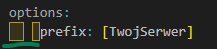
Przy kopiowaniu twojego skryptu, wylały mi się taby w drugiej linijce Musiałeś jakoś źle skopiować, niby nic trudnego do naprawy ale jak ktos nic nie ogarnia to nie bedzie wiedziec czemu nie dziala.
-
raczej mało przydatne, łatwo ominąć, tak jak kolega wyżej napisał lub po prostu wystarczy tabować
-
Zaspoileruję, że skrypt nie będzie działać, brak tabów, czy osób do jakich jest wysyłana wiadomość (w przypadku wersji 2.8). Pomijając, że źle jest to zrobione. on load nie jest do zapisywania takich rzeczy, od tego jest options Tak samo nie używa się czegoś takiego "execute console command"
-
command /Setchest: trigger: set block at player to dirt set {Rchest} to location at player send "&apomyslnie utworzyles skrzynie skarbow" on right click on dirt: if distance between location of target block of player and {Rchest} is smaller than 1: send "&abrawo udalo sie! :)" to the player else: send "&cniestety to nie to zle kordynaty :(" to the player To będzie działać. Problem był w tym, że lokacja bloku i gracza (zapisana w zmiennej) nie pokrywała się ze soba w 100%, była różnica np 0.3 kratki przez to nie działało. Ja tutaj zrobiłem margines błedu 1 bloku, myślę, że w niczym nie przeszkodzi, a rozwiązuje problem.
-
Porady? 1. Nie używaj execute player/console command 2. Nie rób ściany z wait second, to można bardzo prosto zautomatyzowac poprzez while 3. Można zrobić 1 komende z dwoma argumentami zamiast 2 komendy
-
https://github.com/SkriptLang/skript-worldguard A to?
-
nic dziwnego skoro pisalo to ai Na ogół wszystko co z mobami to najlepiej w mythicmobs zamiast w sk
-
command /mamlive [<text>]: trigger: while player is online: send "&a%player% ma LIVE! Wbij do niego.%nl%Jego profil to: %arg-1%" to all players wait 3 minutes
-
nie dodasz, nie wspiera on skripta uzyj https://magmanode.com/ aternos to sciek
-

jak zrobic skrypt na efekt ktore nadaja sie na graczy w poblizu 10 kratek
Fendi odpowiedział(a) na elo12321371 pytanie w Pytania i problemy
bo w kodzie masz wpisane 3s -
jak zrobic skrypt na efekt ktore nadaja sie na graczy w poblizu 10 kratek
Fendi odpowiedział(a) na elo12321371 pytanie w Pytania i problemy
Przeciez to nie ma znaczenia
-
jak zrobic skrypt na efekt ktore nadaja sie na graczy w poblizu 10 kratek
Fendi odpowiedział(a) na elo12321371 pytanie w Pytania i problemy
Składnia dobra, on pewnie jakoś to źle wpisał
-
Zaloz własny wątek zamiast w tym pisac
-
jak zrobic skrypt na efekt ktore nadaja sie na graczy w poblizu 10 kratek
Fendi odpowiedział(a) na elo12321371 pytanie w Pytania i problemy
Cały kod podaj -
jak zrobic skrypt na efekt ktore nadaja sie na graczy w poblizu 10 kratek
Fendi odpowiedział(a) na elo12321371 pytanie w Pytania i problemy
https://skripthub.net/docs/?id=1101 gdzie jako entity wpisujesz loop-player

